Conformal/history menu
In this mode, you can do two separate things, which nevertheless work well together. One of these features is displaying the history of the game; another feature is displaying the world of HyperRogue in one of the conformal models of hyperbolic plane (see Vladimir Bulatov's presentation) -- that is, ones where angles do not change, thus there is no distortion. This document explains how to use the features of the conformal/history menu (CH menu for shot).Line animation
Interestingly, unless you return to a place you have been before, most of the path your character takes can be approximated by a straight line in the hyperbolic plane. The only exceptions are the cases when you return to a place you have been before and wander in another direction -- this typically happens during the Yendor quest, and also in the Ivory Tower and Yendorian Forest.Press 'e' in the CH menu, and the game will start automatically scrolling along this straight line. Note that this could be considered cheating in some situations, so it is only allowed after gameover, or in the cheat mode. Obviously, you also need to move from your starting point a bit.
You can also press 'a' to configure the speed of this animation, and 'r' to rotate it. You can also press 'i' to include the character's actual path, and locations of found items and killed monsters.
Poincaré half-plane model

Yendorian Forest |
It is possible to zoom in/out this model (and other conformal models too) by changing the 'zoom' (z) parameter in the basic HyperRogue configuration.
Band model

Band model is a not very well known model of hyperbolic plane. A certain straight line H in HyperRogue's world is taken, and that line is mapped to an Euclidean straight line E, while places further and further from H are conformally mapped into smaller and smaller places, so we obtain a band in the end. You can activate this model with 'm' in the CH menu, or see how horocycles look (again, setting the rotation appropriately) , but this model really shines with the line animation -- when H is taken to be the line connecting the starting and ending point of your travel, and the animation is basically moving the band horizontally.
Render band to a file
By activating the band model ('m') and the line animation ('e') together, you can watch the moving band on the screen, but you can also render the whole band to an image file. Change the width of the band by pressing ('d') (shift-d to reduce). Since we could obtain very long bands, they are automatically cut into segments -- press 's' to change the size of a segment. Then press 'f' to save to a file. Here are some bands obtained in this way: Chaos mode (a vertical HTML file) , going through three Camelots (a large PNG file).
HyperRogue can be also configured to render bands automatically when the game ends or the Orb of Safety is used -- press 'o' to enable this, then 'j' to decide whether include history or not.
Spiral

Windy Plains |

Whirlpool |

Zebra |
Polygonal model

Vineyard |

Emerald Mines |
Polynomial model
In this model, the coefficients of the Taylor series which describes the conformal mapping can be given explicitly. It is possible to edit the coefficients here, but probably it's more convenient to edit the configuration file.Other models available in HyperRogue

Crossroads III (Klein-Beltrami) |

Red Rock Valley (Gans) |
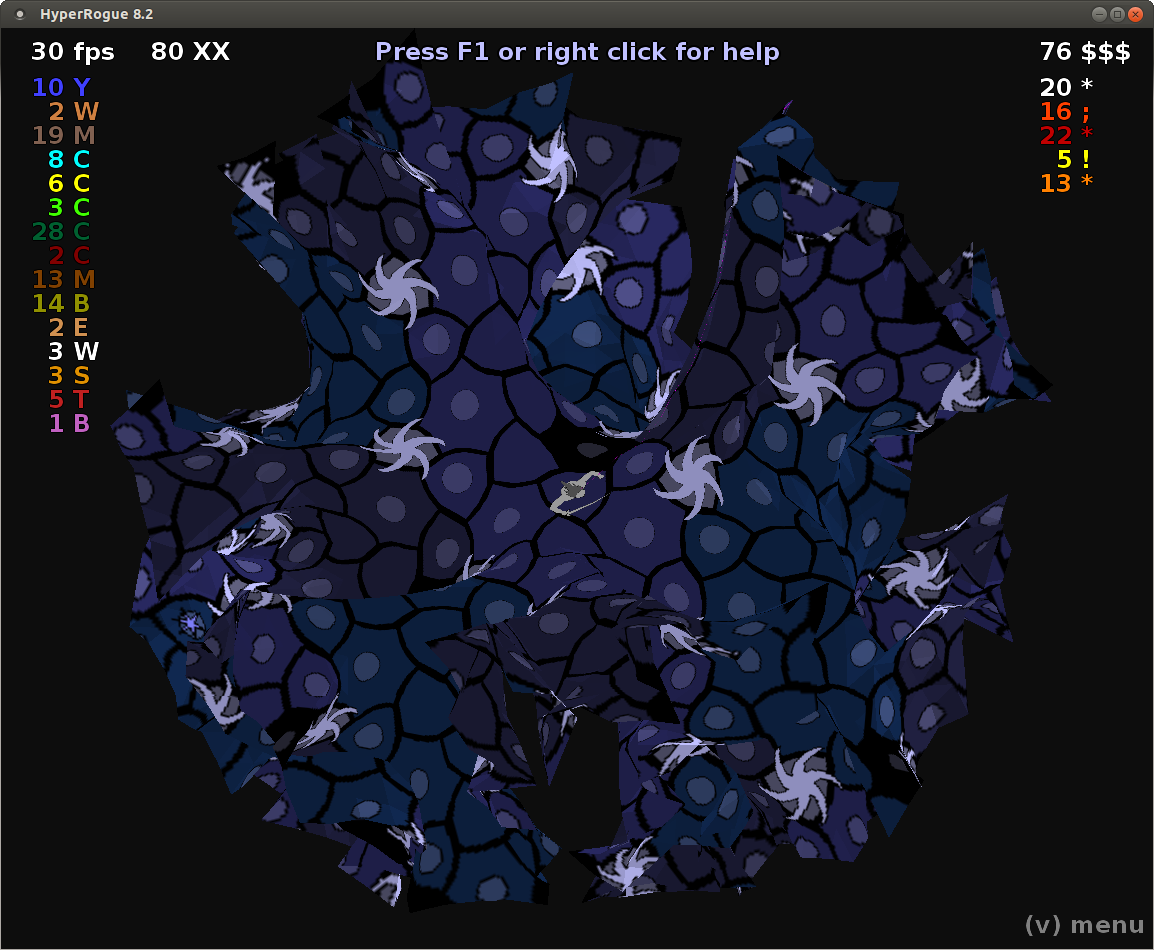
Windy Plains (Hypersian Rug) |

Desert (paper model) |
- The Klein-Beltrami model can be obtained by setting the 'projection' parameter (p) in the basic HyperRogue configuration to 0. (The Poincaré disk model is obtained with 1.)
- The Gans model cannot be obtained directly, but it is the limit when you increase projection and zoom at the same time. Press 'o' while in the projection configuration to do this.
- The Hypersian Rug mode and paper model are available from the special modes menu. They attempt to isometrically embed a part of HyperRogue's world into a 3D space.
- The conformal menu also includes two non-conformal models (Lambert azimuthal equi-area, and azimuthal equidistant). Azimuthal means that the angles from the central point O (usually the PC position) are preserved, i.e., straight lines going through the central point will be mapped to (segments of) straight lines. Poincaré model is azimuthal, Klein-Beltrami and Gans are azimuthal too, but distances from the central point are mapped in different ways. In the azimuthal equidistant model, if O and A are mapped to O' and A' respectively, the distance between O' and A' will be proportional to the real hyperbolic distances between O and A (of course this works only when one of the points is the central point). In the Lambert azimuthal equi-area model distances are mapped in such a way that area in the model is proportional to the real area in the hyperbolic plane.
It is possible to enable several of these at once -- but then, several transformations will be applied, leading to a weird result. If you enable one of the models from the CH menu in the Euclidean mode, you'll get a (glitched) conformal mapping of the plane.
Acknowledgments
Thanks to tehora for showing me Bulatov's presentation, from where I have learned about the band model, and about other possible conformal mappings. The star and the spiral are for her :) We got the idea of the spiral mapping from this art by Ross Hilbert. I wanted to draw the HyperRogue world in a square form after seeing Escher's Square Limit, although a closer inspection reveals that this woodcut is not actually uniform (contrary to his Circle Limit, which are the Poincaré disk model). Thanks to Fulgur14 for pointing me to the square mapping discussion, and to simon_clarkstone for suggestions about automatic band writing. Azimuthal equidistant and Lambert azimuthal equi-area models are based on this video by David Madore.Tweet